Custom Schema in WordPress allows you to add structured data directly into your page code so search engines can better understand your content and display it in enhanced search results. It is one of the most effective ways to improve snippet click-through rates and gain additional visibility in search results without extra effort. Properly implemented markup helps Google and other search engines quickly recognize FAQ sections, articles, products, or organizations, which is especially valuable for blogs, e-commerce sites, and informational pages.
What is Custom Schema and why use it
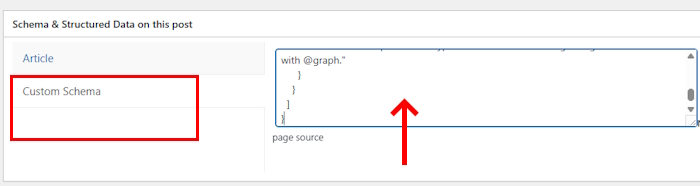
Custom Schema is a field in plugins like Rank Math, Yoast, or Schema Pro where you can insert your own JSON-LD code. It works independently from the plugin’s built-in schema settings and gives you full control over your markup. Search engines use this data to generate rich snippets, which can increase CTR by an average of 10–30%.
By adding code to this field, you can implement schema types that are not available in default plugin settings. For example, you can define a local business, a recipe, or an FAQ without being limited by templates. This is especially useful when standard plugin schemas don’t fully match your content structure.
FAQPage — a basic but not the only option
FAQPage is the most commonly used schema type inserted into the Custom Schema field. It turns a list of questions and answers into rich dropdown-style snippets in search results. For blogs and articles, this is an easy way to increase clicks.
See related materials below:
However, you should not limit yourself to FAQPage. Many websites successfully use other schema types such as Article for posts, Product for e-commerce, or Organization for companies. Each type serves a different purpose and helps search engines better understand the context of your page.
Other useful schema types for WordPress
Article is an excellent choice for blogs and news websites. It highlights the title, publication date, author, and image, increasing the chances of appearing in top results for informational queries. Many U.S. websites use this schema to improve visibility in Google Discover.
{
"@context": "https://schema.org",
"@type": "Article",
"headline": "Article Title",
"datePublished": "2026-03-21",
"author": {"@type": "Person", "name": "Your Name"},
"image": "https://site.com/image.jpg"
}
This gives search engines a clear structure and often leads to enhanced visibility in search results.
Product and ReviewSchema are useful for online stores. They display price, rating, availability, and reviews directly in search results. This is especially effective for commercial pages with high competition.
{
"@context": "https://schema.org",
"@type": "Product",
"name": "Product Name",
"offers": {"@type": "Offer", "price": "299.99", "priceCurrency": "USD"},
"aggregateRating": {"@type": "AggregateRating", "ratingValue": "4.8", "reviewCount": "124"}
}
This type of markup can display star ratings and pricing directly in search listings.
Organization and LocalBusiness are essential for local SEO. They include address, phone number, business hours, and social links, improving visibility in map results and increasing trust signals.
{
"@context": "https://schema.org",
"@type": "LocalBusiness",
"name": "Company Name",
"address": {"@type": "PostalAddress", "streetAddress": "123 Street", "addressLocality": "New York"},
"telephone": "+1-XXX-XXX-XXXX"
}
This strengthens local search presence and helps you rank in Google Maps.
How to correctly insert JSON into Custom Schema
The code is inserted into a dedicated field in your page settings or via a plugin.
The key is to use valid JSON-LD without syntax errors.
After saving, it is recommended to validate the markup using Google’s Rich Results Test or Structured Data Testing Tool.
Proper implementation produces immediate results: search engines begin to better understand your page and display rich snippets more frequently. This is especially noticeable in competitive niches where every additional element in search results can impact traffic.
But that’s not all.
You can combine multiple schema types in a single JSON-LD block. This is done using the @graph structure, which is officially supported by Google and considered best practice.
Example 1: Article + FAQPage (most common use case):
{
"@context": "https://schema.org",
"@graph": [
{
"@type": "Article",
"headline": "Your Article Title",
"datePublished": "2026-03-21",
"author": { "@type": "Person", "name": "Your Name" }
},
{
"@type": "FAQPage",
"mainEntity": [
{
"@type": "Question",
"name": "Question 1?",
"acceptedAnswer": { "@type": "Answer", "text": "Answer to question 1" }
},
{
"@type": "Question",
"name": "Question 2?",
"acceptedAnswer": { "@type": "Answer", "text": "Answer to question 2" }
}
]
}
]
}
Example 2: Product + LocalBusiness:
{
"@context": "https://schema.org",
"@graph": [
{
"@type": "Product",
"name": "Product Name",
"offers": {
"@type": "Offer",
"price": "299.99",
"priceCurrency": "USD"
}
},
{
"@type": "LocalBusiness",
"name": "Your Company Name",
"address": {
"@type": "PostalAddress",
"streetAddress": "123 Main St",
"addressLocality": "New York",
"addressRegion": "NY"
},
"telephone": "+1-212-555-0123"
}
]
}
These examples can be safely added to the Custom Schema field in WordPress. They are valid and work effectively.
Benefits for SEO and search engines
Custom Schema significantly improves how search engines process and rank your content. Google and other platforms receive a clear data structure, increasing relevance and the likelihood of featured snippets.
For your website, this translates into higher traffic and CTR without additional costs. Properly implemented markup works continuously and helps you outperform competitors who rely only on default plugin settings.
In 2026–2027, Custom Schema remains a powerful tool that should be used on all important pages. It requires minimal setup and can deliver noticeable results within just a few weeks of implementation.

I’m Ethan Carter, an American developer and technical writer with more than 20 years of experience in systems and application programming. My core specialty is low-level development in Assembler: 22 years of hands-on work, including deep experience in code optimization, CPU architecture, and performance-critical solutions. I also hold a PhD in Assembler and have spent more than 18 years working with ASP.NET, building enterprise web systems, APIs, and scalable backend solutions.
In addition, I have 9 years of experience in C++ and C#, along with 7 years of hands-on microcontroller programming in Assembler. Thanks to this mix of academic background and practical engineering experience, I can write about software architecture, low-level optimization, and modern development in a way that makes complex technical topics clear for a professional audience.