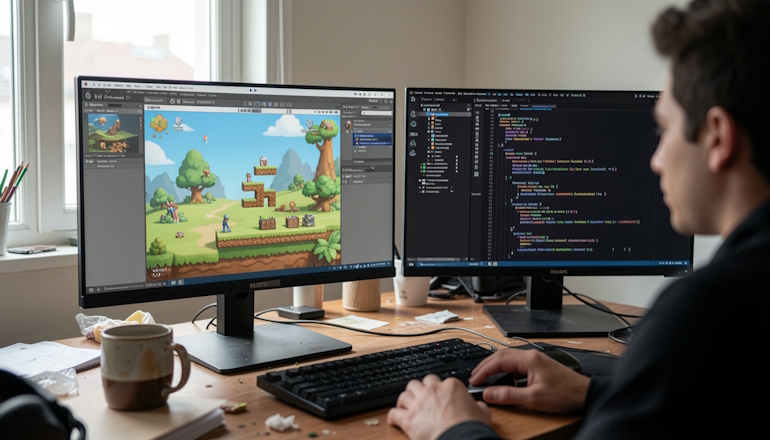
Who says only a select few can build Android games? In 2026, the options are so broad that a beginner can start with a no-code visual builder, while a pro can squeeze every last drop of performance out of native C++. Hundreds of thousands of apps come out every year, and each one is built on a specific language or engine. In this article, I will walk through all the main ways to develop for Android, from the classics to the newer options, and give you a clear path to get started.
In Simple Terms: Where Does It All Begin?
Imagine you want to build a house. You can grab ready-made blocks and snap them together like a kit — fast and without much knowledge. Or you can lay every brick by hand and control every inch.
Game development works pretty much the same way. There are engines — basically ready-made kits packed with tools. Unity, Godot, and Unreal Engine handle the heavy lifting for graphics, physics, and sound. Then there are “raw” languages like Java, Kotlin, and C++. That is more like laying bricks yourself: slower, harder, but with complete control.
What you choose depends on what you want to build:
- A simple 2D arcade game or puzzle can be put together in a visual editor in one evening.
- A complex open-world shooter will need a powerful engine and probably C++.
- And if you dream of a high-load app with near-perfect performance, your path goes through Kotlin or Java.
The main thing is not to worry that you picked the wrong tool. In 2026, languages and engines are so well integrated that if you start with one, switching later is easy.
A Classic That Still Matters: Java for Android
Java was the official Android development language from the moment the platform was born.
A huge number of the apps and games you see in Google Play were written in it. It is an object-oriented language with a massive community and millions of ready-made solutions. For a beginner, Java can feel wordy because even simple things often require a lot of code, but it is incredibly stable and predictable. In 2026, Java is still one of the key Android languages, especially for maintaining older projects and enterprise apps.
Why is Java still relevant?
- First, it is reliable and has a long lifecycle. Big companies do not rewrite million-dollar projects in new languages just because it is trendy. That is expensive and risky.
- Second, Java has an enormous ecosystem: thousands of libraries, code snippets, and detailed documentation. If you get stuck, the answer is probably already on Stack Overflow.
- Third, knowing Java is a direct gateway into enterprise development, where the language still dominates on the backend.
On the other hand, Java is an older language, and it lacks many modern conveniences. For example, you can easily run into the famous NullPointerException when code tries to use a null value. Java code often gets bulky because you have to write a lot of boilerplate. Still, if you want to understand Android from the inside and can live with some verbosity, Java is a great choice.
If you want to build a full game in pure Java without an engine, you will need to learn the Android SDK, OpenGL, or Vulkan, which takes serious effort.
The Future That Is Already Here: Kotlin

Kotlin is Google’s official language and the one that came after Java.
It was created by JetBrains, the company behind Android Studio, and developers immediately loved it for its clean syntax and safety. You can write two or three times less code in Kotlin than in Java, and it is fully compatible with Java. You can use old Java libraries in Kotlin projects and the other way around. In 2026, most new Android projects start in Kotlin, and Google actively promotes it as the primary language.
What are the biggest advantages of Kotlin?
- It has null safety: the type system helps prevent accidental null access.
- It has coroutines — a convenient way to write asynchronous code without blocking the main thread.
- It has a modern syntax with plenty of useful features: data classes, extension functions, and scope functions.
- It also has Kotlin Multiplatform, which lets you share code across Android, iOS, and even the web. If you plan to build not just a game but also, say, a backend, Kotlin is your pick.
What are Kotlin’s drawbacks?
Probably only one: it is relatively young, so it is harder to find someone with decades of experience in it than a Java developer.
But that is becoming less and less of an issue as the community keeps growing fast. Kotlin is also easier to learn than Java if you already know the basics of programming. To make a game in pure Kotlin without an engine, you still need the same Android SDK knowledge as with Java, but writing the code is usually more pleasant.
In 2026–2027, Kotlin is the default choice for anyone starting a new Android project.
Heavy Artillery: C++ for Demanding Games
If you are aiming for a 3D open-world shooter or any other game where performance matters, C++ is the way to go. This language gives you maximum control over the hardware and lets you optimize code down to the last byte. The most demanding games on Google Play are written in C++, as are the legendary Unreal Engine and Source engines. In 2026–2027, C++ is still essential for AAA projects where every frame counts.
But the price of that performance is complexity.
- C++ is considered one of the hardest languages to learn.
- You manage memory yourself, which means it is easy to cause a leak or a bug that crashes the whole game.
- The compiler will not hold your hand, and debugging C++ is much harder than debugging Java or Kotlin.
- So if you are a beginner, C++ is not the best place to start. It is much smarter to use a ready-made engine that handles the routine work for you and write only the critical parts in C++.
To build an Android game in C++, you will need the Android NDK (Native Development Kit), which lets you compile C++ code into an app. You will also need to learn OpenGL ES or Vulkan for graphics work. It is a difficult path, but a rewarding one, and it opens the door to high-performance gaming. Many indie developers and small studios use C++ together with Unreal Engine, which handles most of the routine work and lets them focus on gameplay.
The Workhorse: C# and the Unity Engine
Unity is the most popular game engine in the world, and its main language is C# (C Sharp).
It sits in the sweet spot between power and simplicity. Unity hides tons of low-level details from you: you work in a visual editor, drag objects around, tune physics, and use C# to write logic — how a character reacts to buttons, what happens on collision, and how the score changes. You can start making games in Unity from scratch without deep programming knowledge.

Why are Unity and C# so popular?
- First, cross-platform support: write the game once, and you can build it for Android, iOS, Windows, Mac, consoles, and even the web.
- Second, there is a huge community and an asset store full of ready-made content. You will find thousands of scripts, models, sounds, and effects you can use in your game.
- Third, C# is modern, convenient, and safe, and it is much easier than C++ while still staying close to it in gaming performance.
In 2026–2027, Unity is still evolving fast, with new tools for optimization and Android builds. You can create a full game on your own or with a small team without spending millions of dollars.
Publishing on Google Play does not require any special permissions — standard developer registration is enough. If you want to see results quickly and you are not afraid to learn the engine interface, Unity and C# are your best bet. Most indie developers start there, and it is one of the easiest roads to making a commercially successful game.
Exotic and Niche Options

Beyond the main languages, there are alternative approaches.
- Python, for example, can be used through frameworks like Kivy or BeeWare, but it is not a good fit for serious games because of its lower performance.
- HTML5 and JavaScript let you create web games that can be wrapped for Android, but that approach is limited in what it can do.
- Godot is a free and open-source engine that is getting more and more popular. It supports its own language, GDScript, which is very similar to Python, as well as C# and C++. Godot is ideal for 2D games and small 3D projects, and it is completely free, with no revenue share.
Let’s talk a little more about Python.
Python used to be considered for Android development because of how simple it is, but these days that idea has mostly been dropped because of some fundamental limitations.
- First, there is performance: Python is an interpreted language, which means it needs its own “translator” at runtime. That makes apps slower and significantly heavier. Even a simple Kivy app can end up weighing 30 MB or more.
- Second, Android is natively built around Java/Kotlin through the ART runtime, and embedding Python requires extra layers. That leads to higher battery use and lower FPS in games.
- Third, the ecosystem: even with projects like Kivy and BeeWare, Python’s mobile platform support is still pretty weak, the community is small, and a lot of libraries like NumPy and Pandas still are not properly adapted for Android.
In the end, for serious games and apps, Python loses to native languages on every major point, and it stays mostly a niche tool for prototyping or learning.
So if you are serious about Android game development, it is better to choose one of the main four: Kotlin, Java, C++, or C# (Unity). They have the strongest support, the biggest communities, and the widest range of options.
The other options are better for very specific tasks or for experimentation. Do not scatter your energy on exotic tools if your goal is to release a solid product.
Where Should a Beginner Start? A Step-by-Step Plan
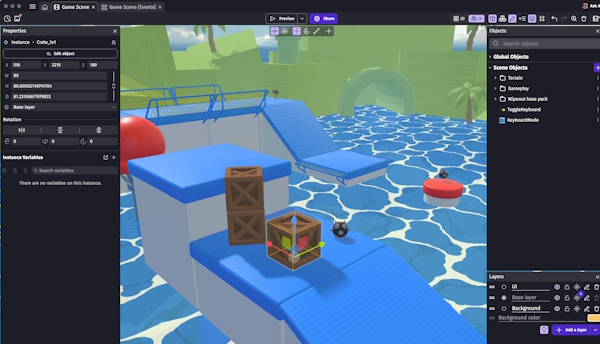
So, you want to make an Android game. Where do you start so you do not get discouraged and quit halfway through?
Step 1. Choose a tool. The easiest and fastest way is a no-code visual builder. For example, GDevelop (shown above) or Construct 3. You build the game by dragging blocks around, and the program generates the code for you. It is perfect for prototyping and simple 2D games. If you want something more serious, go with Unity. Download Unity Hub, install the engine itself, and add the Android build module. The official site has dozens of free tutorials for beginners.
Step 2. Learn the basics of C#. You do not need to become an expert, but you do need to understand the fundamentals: variables, loops, conditions, and functions. That usually takes anywhere from a couple of weeks to a month. At the same time, watch Unity tutorials. The best way is to make a simple clone game: Arkanoid, a platformer, or a racing game. That way you learn the core concepts in practice: creating objects, controlling the camera, and handling collisions.
Simple C# example. If A is less than B, print the matching message, and if A is greater than B, print the numbers between A and B:
int a = 5;
int b = 3;

if (a < b)
{
Console.WriteLine("a is less than b");
}
else if (a > b)
{
Console.WriteLine("Values between a and b:");
for (int i = b + 1; i < a; i++)
{
Console.WriteLine(i);
}
}
// If a == b, do nothing
Step 3. Set up the Android environment. In Unity, you need to install Android Build Support and download the Android SDK and NDK. Unity can do this for you, but version issues sometimes come up. If they do, do not panic: you probably just need a specific version of the Java Development Kit (JDK) or to accept the Android SDK licenses. The instructions are all on the official websites. Once everything is configured, you can press one button and compile your game into an APK that can be installed on a phone.
Step 4. Register in Google Play Console. It costs about 25 dollars once. There you fill out the app information, upload icons, screenshots, and the APK itself. The review process usually takes a few hours or days. If everything is done correctly, your game will show up in the store. Now millions of users can download it.
Step 5. Do not stop. Making your first game is just the beginning. Listen to feedback, fix bugs, and add new content. Learn more advanced topics: optimization, multithreading, shaders. Join game jams and talk to other developers. The world of game development is huge, and there is always more to learn.
The path from beginner to someone who has released a first game can take anywhere from a couple of months to half a year. The main thing is not to be afraid and just do the work. In 2026, you have everything you need.
Good luck!
A Concrete Example of a Game

For example, what is a complex ARPG like Diablo Immortal written in?
Diablo Immortal is a genuinely complex development project built through the combined efforts of Blizzard and NetEase. Its core is NetEase’s own Messiah engine, written in C++. That engine powers the game across Android, iOS, and PC.
The graphics side is another major strength. The game uses the Vulkan API, which makes it possible to tap into hardware-accelerated ray tracing for realistic reflections and real-time visual effects. On top of that, the NetEase team worked closely with Pixelworks to implement IRX technology, which helps maintain a high frame rate — up to 120 FPS — while keeping power usage efficient.
It is worth noting that during development, the team used Unreal Engine 5 to create high-quality pre-visualization. But the actual game runs on the custom Messiah engine, which was specifically optimized for mobile devices.
So does that mean you need to know engines more than languages now?
In short, yes: for most modern Android games, it is more important to know the engine — Unity, Unreal, or Godot — because those handle graphics, physics, and builds for multiple platforms.
But the engine still requires a language (C# for Unity, C++ for Unreal). Raw languages without engines are mostly used only for very simple or heavily optimized games.

I’m Irina Petrova-Levin, a graduate of the Moscow Technical University of Communications and Informatics (MTUCI), where I earned my degree in Information Technology. My professional journey has been deeply rooted in JavaScript, PHP, and Python, driven by a profound fascination with how modern technology shapes our everyday lives. I strive to explain complex processes in a clear and accessible way without ever sacrificing accuracy or missing the core of the matter.
Now based in Dallas since 2019, my work reflects a unique synthesis of Eastern European engineering depth and the dynamic American tech mindset. This blend allows me to bridge two distinct technological traditions.
My goal is to deconstruct the real mechanisms behind the devices and systems we use daily. In my articles, I aim to deliver information that is not only practical and structured but also reveals the hidden logic of how our world actually works.