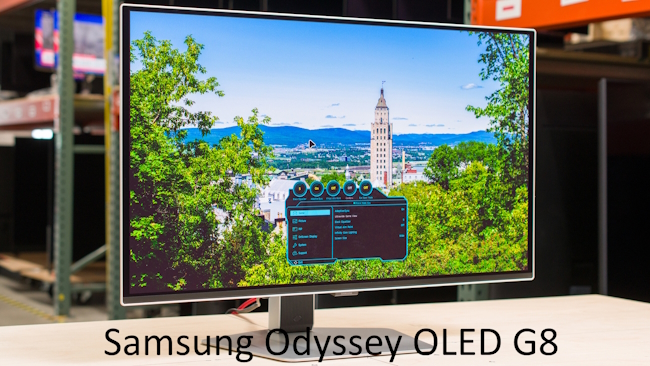
The gaming industry in 2026 offers monitors that seemed like science fiction just a few years ago — 4K resolution at 240 Hz, OLED panels with instant response, and dual-mode displays that switch between speed and image quality.
When choosing a monitor with a 4–5 year outlook, you need to consider not only today’s games but also the demands of future graphics cards and consoles. The secret to a long‑term purchase is balancing features that are already standard with those just gaining traction but destined to become essential.
Prices for cutting-edge technology have become noticeably more affordable in 2026. While OLED monitors used to be an enthusiast’s luxury, manufacturers like AOC and LG now offer reasonably priced models with QD‑OLED panels and Dual‑Hz modes. This means a smart shopper can buy a monitor that won’t feel obsolete even five years down the road without overpaying for outright overkill features.
The key is to clearly understand what games and tasks you’ll use it for, and which specifications matter most.
4K resolution is no longer exclusive to flagship models — even mid‑range monitors support it. For future‑proof gaming, 4K delivers incredible detail, especially on 27‑inch and larger screens where pixels become invisible.
However, 4K demands a powerful graphics card, so for fast‑paced shooters it’s worth looking at monitors with Dual‑Hz technology, which lets you instantly switch between 4K 160 Hz and Full HD 320 Hz depending on the game.
Dual‑Hz is a monitor mode that allows switching between different combinations of resolution and refresh rate. Typically, it offers either high resolution with moderate refresh (e.g., 4K 160 Hz) or lower resolution with extreme refresh (e.g., 1080p 320–480 Hz). An ideal solution.
If you can’t get such a monitor, 1440p (QHD) remains the sweet spot — detailed enough for most titles yet not as GPU‑intensive as 4K. However, it’s not recommended in 2026 – it’s becoming outdated.
4K is gradually ceasing to be the technological limit for displays. While it remains the mainstream standard for monitors and TVs, the industry is already shifting toward 8K and higher resolutions. Panel manufacturers are developing 8K screens with higher pixel density, improved HDR, and high refresh rates, while next‑gen DisplayPort and HDMI interfaces are gradually removing bandwidth limitations.
As panels become cheaper and GPU performance grows, 8K will slowly occupy the same niche that 4K once held, moving 4K from flagship status into the standard category.
Refresh rate – 120 Hz has long been the baseline for gaming, but in 2026 the comfortable minimum is 144–165 Hz. For competitive shooters and esports, consider models with 240 Hz or higher, such as 240 Hz OLEDs or 320–360 Hz fast IPS panels. Such high refresh rates make motion not just smooth but “liquid,” giving a reaction time advantage.
Bear in mind that unlocking 240+ Hz requires a powerful CPU and GPU; otherwise, you simply won’t achieve the needed frames per second.
HDR10 support (and advanced standards like DisplayHDR 1000) dramatically improves visuals in graphically rich games. Good HDR adds depth, true blacks, and bright highlights, especially noticeable in horror games and atmospheric RPGs.
But don’t trust marketing claims alone – a monitor that claims HDR on paper may not deliver quality. Look for models with VESA DisplayHDR certification, which guarantees a certain level of brightness and color gamut.
Response time of 1 ms or less is mandatory for any monitor claiming to be gaming‑ready.
However, there are nuances: manufacturers often quote MPRT (Moving Picture Response Time), achieved by black‑frame insertion, which doesn’t reflect actual pixel transition lag. It’s safer to rely on GtG (grey‑to‑grey) figures and real‑world tests.
OLED monitors excel here – their response can be as low as 0.03 ms, virtually eliminating ghosting and blur even in the fastest scenes.
Screen size from 24 to 28 inches is ideal for most players. 24 inches is an esports classic, promoting focus and quick reactions. 27 inches is the all‑rounder, comfortable for any genre and for work.
At 28 inches and above, you definitely need 4K resolution; otherwise, pixel density suffers and graininess becomes noticeable. Curved screens enhance immersion but require you to sit centered; otherwise, geometry can distort.
Panel type is perhaps the most crucial choice, defining the image for years.
New‑generation IPS panels (Fast IPS) offer excellent color, wide viewing angles, and response down to 1 ms, making them versatile for any genre.
VA panels win on contrast and deep blacks but may lag in fast scenes due to slower response.
TN panels in 2026 are no longer recommended – they lose to competitors in image quality with no real speed advantage.
OLED panels: the future choice. See below.
IPS or OLED for a Gaming Monitor?
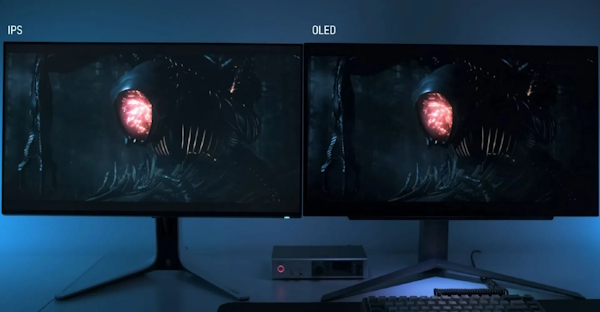
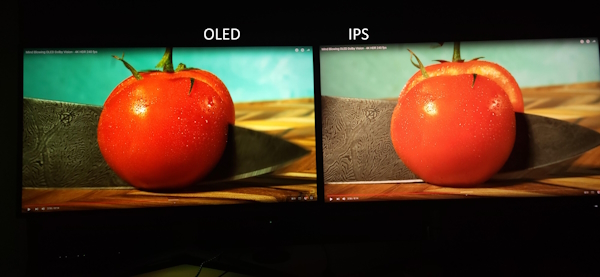
If you’re investing in a monitor for several years ahead (e.g., with a 5‑year outlook) and ready to invest in quality, OLED is practically the undisputed leader.
The nature of organic LEDs delivers perfect black, infinite contrast, and instantaneous 0.03 ms response.
In 2026, OLED monitor prices have dropped, making them far from exotic – for example, 27‑inch QD‑OLED models with 240 Hz are available at reasonable prices.
The only downside is potential burn‑in over many years, but modern technologies (pixel shift, screen savers) have minimized this risk.
IPS panels remain the choice for maximum versatility if you’re not ready to accept OLED’s quirks.
Contemporary Fast IPS panels have nearly caught up with TN in speed while preserving excellent viewing angles and color reproduction.
They’re ideal for mixed use – gaming, graphics work, watching videos.
Moreover, IPS monitors with 180–240 Hz and 1 ms response cost noticeably less than OLED alternatives. IPS also has no burn‑in issues, and peak brightness is usually higher, important in bright rooms.
Regarding long‑term perspective, OLED offers a leap in image quality that will delight you for five years.
IPS is a proven, reliable, predictable technology that won’t disappoint. If your budget allows and you’re willing to take moderate care of your gear, go OLED.
If you need a universal soldier with no compromises and minimal fuss, choose a quality IPS. VA only makes sense as a budget alternative, trailing both leaders.
Response Time and Its Impact on Different Game Genres
Monitor lag comprises two components: pixel response time (how fast a pixel changes color) and input lag (delay between user action and on‑screen result).
Pixel response time: The time it takes for a pixel to transition from one color to another. Lower values mean less motion blur and ghosting.
Input lag: The delay between your action (mouse click, key press) and the result appearing on screen. Low input lag makes controls feel more responsive and precise.
For fast‑paced games, both parameters are critical, and the monitor should deliver consistently low values without drops. In 2026, even budget gaming models offer acceptable lag, but for maximum comfort, look for certified 1 ms response and G‑Sync/FreeSync support that synchronizes frames with your GPU.
First‑person shooters (CS2, Valorant, Call of Duty) are the most demanding when it comes to response time. Here, lag decides duels. You need ≤1 ms response and ≥240 Hz refresh to keep image updates instantaneous and blur‑free. Any trailing or delay can cost you a frag. OLED with 0.03 ms is unbeatable.
Breaking down other genres:
MOBA and RTS (Dota 2, League of Legends, StarCraft): Overall smoothness matters more than absolute minimal lag; reaction demands are mostly micro‑control. 144–180 Hz and ≤2 ms response suffice. The key is that the monitor doesn’t introduce discomfort when quickly panning across the map.
MMORPG and RPG (World of Warcraft, Cyberpunk, Diablo 4, Path of Exile 2): Image quality takes priority over milliseconds of lag. While monitors with 4–5 ms response and 60–120 Hz can work, 120+ Hz is still recommended for general comfort. Good HDR and color gamut are important for these genres.
Racing simulators and fighting games (Forza Horizon, GTA 6, Mortal Kombat 1): They need high frame rates and minimal motion blur to see the track or react to opponents clearly. 1–2 ms response and 144+ Hz are ideal. Fast IPS and OLED both deliver vivid images without sacrificing speed.
Single‑player story games and horror: Lag is less critical than immersion. Deep blacks, contrast, and smooth motion rule. OLED’s perfect black is perfect for horror, while a quality IPS with 100+ Hz will provide an excellent experience in action‑adventures.
Example Monitors
All the models we selected meet the following requirements:
4K
≥120 Hz (typically 144–160 Hz or higher)
HDR10
~1 ms response time or faster
27–28″ screen size
IPS or OLED panels
Acer Nitro XV275K P3
One of the strongest HDR performers among 27″ IPS monitors thanks to its Mini-LED backlight.
Screen size: 27″
Panel: IPS (Mini-LED backlight)
Resolution: 4K
Refresh rate: up to 160 Hz
Response time: ~1 ms
HDR: HDR1000
LG UltraGear 27GR93U-B
A very popular 4K 144Hz IPS monitor. It offers around 95% DCI-P3 color coverage, fast response times, and solid HDR performance for its class.
I’m Irina Petrova-Levin, a graduate of the Moscow Technical University of Communications and Informatics (MTUCI), where I earned my degree in Information Technology. My professional journey has been deeply rooted in JavaScript, PHP, and Python, driven by a profound fascination with how modern technology shapes our everyday lives. I strive to explain complex processes in a clear and accessible way without ever sacrificing accuracy or missing the core of the matter.
Now based in Dallas since 2019, my work reflects a unique synthesis of Eastern European engineering depth and the dynamic American tech mindset. This blend allows me to bridge two distinct technological traditions.
My goal is to deconstruct the real mechanisms behind the devices and systems we use daily. In my articles, I aim to deliver information that is not only practical and structured but also reveals the hidden logic of how our world actually works.